What Is a Good PS5 Connection Speed? (Speed Guide 2026)
What Is a Good PS5 Connection Speed? For most players, 50 Mbps download and 10 Mbps upload are good targets for smooth gaming, faster downloads, and fewer connection problems. If you play online games often, 100 Mbps or higher gives smoother gameplay, faster downloads, fewer delays, and a better overall PS5 gaming experience.
What Is a Good PS5 Connection Speed?
What Is a Good PS5 Connection Speed? It depends on how you use your console. For most online gaming, 50 Mbps download and 10 Mbps upload provide a good balance of speed and performance.
Connection speed is only one part of good gaming. A stable internet connection and low ping also help reduce lag, improve online matches, and make downloads faster. Even with high speeds, an unstable connection can still cause problems.
What Is a Good Download Speed for PS5?
Download speed is the rate at which your PS5 receives data from the internet. It affects how quickly you can:
- Download new games
- Install game updates
- Load online content
- Stream videos and movies
Here is a simple guide:
- 10 to 25 Mbps: Good for casual gaming and small downloads.
- 50 Mbps: A great choice for most PS5 players.
- 100 Mbps or more: Best for large game downloads, multiplayer gaming, and homes with many connected devices.
Remember that faster download speeds save time, especially since many modern PS5 games are over 100 GB.
What Is a Good Upload Speed for PS5?
Upload speed is the rate at which your PS5 sends data to the internet. It is important for:
- Online multiplayer games
- Voice chat
- Live streaming
- Sharing gameplay clips
For most players, 10 Mbps upload speed is more than enough. If you stream your gameplay on platforms like Twitch or YouTube, you may benefit from 20 Mbps or higher.
Although upload speed is usually lower than download speed, it still plays an important role in keeping online games smooth and responsive.
Why Does PS5 Connection Speed Matter?
A fast and stable internet connection helps your PS5 perform better in many ways. It reduces waiting times, improves online gameplay, and makes downloading games much faster.
Good internet speed can help you:
- Download games faster.
- Install updates in less time.
- Reduce lag during online matches.
- Enjoy smoother voice chat.
- Stream videos without buffering.
However, speed alone is not enough. Your network quality, router, and ping also affect your gaming experience.
How Download Speed Affects PS5 Gaming
Download speed mainly affects how quickly your PS5 receives data.
With faster download speeds, you can:
- Install games sooner.
- Download updates faster.
- Load digital content more quickly.
- Spend less time waiting.
For example, downloading a 100 GB game takes much less time on a 100 Mbps connection than on a 20 Mbps connection.
How Upload Speed Affects Online Play
Upload speed helps your PS5 send information to game servers.
This includes:
- Your player movements.
- Voice chat.
- Match data.
- Game saves that sync to the cloud.
If your upload speed is too low, other players may notice delays, voice chat may cut out, and online matches may become less stable.
Why Ping and Latency Matter More Than Speed
Many people focus only on internet speed, but ping is often more important for online gaming.
Ping measures how quickly your PS5 communicates with the game server. Lower ping means faster responses.
As a general guide:
- Below 20 ms: Excellent
- 20 to 50 ms: Very good
- 50 to 100 ms: Playable for most games
- Above 100 ms: You may notice lag and delays
Even if you have a 500 Mbps connection, high ping can still make online games feel slow. A stable connection with low latency usually provides a better gaming experience than extremely high download speeds.
What Causes Slow PS5 Connection Speed?
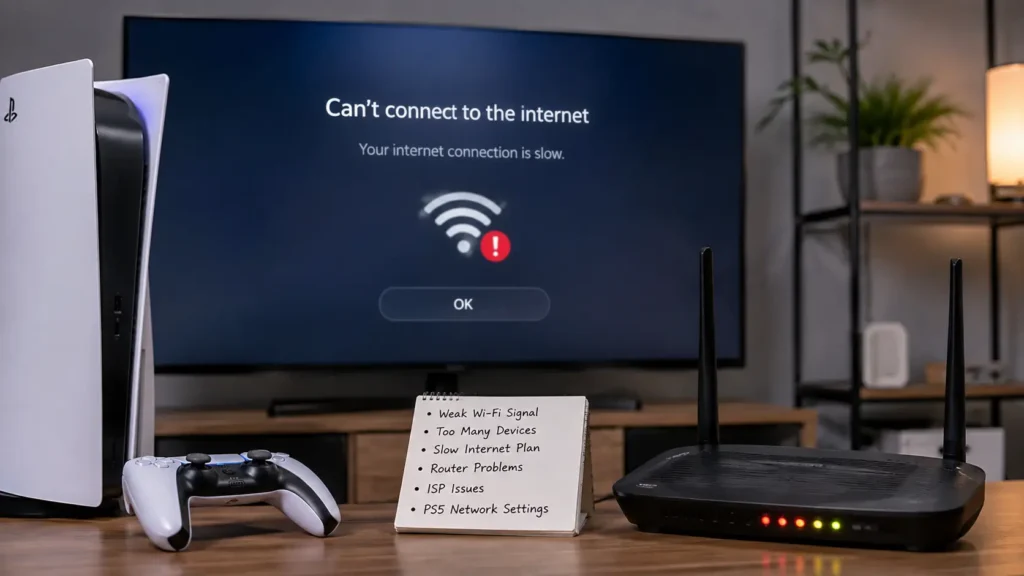
If your PS5 internet speed seems slower than expected, several common issues may be responsible. Finding the cause is the first step toward fixing the problem.
Weak WiFi Signal
A weak WiFi signal is one of the biggest reasons for slow PS5 speeds.
Your signal may become weaker if:
- The router is far from the console.
- Thick walls block the signal.
- Furniture or appliances interfere with WiFi.
Moving your PS5 closer to the router or using an Ethernet cable often improves connection quality.
Too Many Devices Using the Internet
Every connected device shares your internet bandwidth.
If people in your home are:
- Streaming videos
- Downloading large files
- Joining video calls
- Playing online games
your PS5 may receive less available speed.
Limiting heavy internet use while gaming can improve performance
Slow Internet Plan
Sometimes the problem is your internet plan rather than your PS5.
For example, a basic plan with only 10 or 20 Mbps may work for light browsing but struggle with modern online gaming, large downloads, and multiple users.
Upgrading to a faster plan may provide a better overall experience.
PS5 Network Settings
Incorrect network settings can also affect connection speed.
Check that:
- Your PS5 software is updated.
- Your network settings are configured correctly.
- You connect to the best available WiFi band, such as 5 GHz when possible.
Restarting your network connection can also solve temporary issues.
Router or ISP Problems
Sometimes the issue is outside your home.
Possible causes include:
- An outdated router.
- Temporary ISP outages.
- Network congestion during busy hours.
- Router firmware that needs updating.
If your internet speed remains slow after basic troubleshooting, contact your internet provider to check for service issues.
What Internet Speed Does a PS5 Need?
The internet speed your PS5 needs depends on what you do most. Playing online games does not require extremely fast internet, but downloading games, installing updates, and sharing the connection with other devices do.
A stable connection is just as important as speed. If your internet often disconnects or has high ping, you may still experience lag even with a fast plan.
Below are the recommended speeds for different types of PS5 users.
Minimum Speed for Casual Gaming
If you mostly play online games and do not download large files often, you do not need an expensive internet plan.
A good minimum speed is:
- Download: 10 to 25 Mbps
- Upload: 3 to 5 Mbps
- Ping: Under 50 ms
These speeds are enough for online gaming, party chat, and small game updates. However, large downloads will take longer.
Recommended Speed for Most Players
For most PS5 owners, this is the best balance between speed, price, and performance.
Recommended speeds:
- Download: 50 Mbps
- Upload: 10 Mbps
- Ping: Under 30 ms
With these speeds, you can:
- Play online games smoothly.
- Download updates faster.
- Join voice chat without problems.
- Stream videos while gaming.
- Handle multiple devices on the same network.
This speed is ideal for the average household.
Best Speed for Fast Downloads and Updates
Modern PS5 games are often very large. Some titles require over 100 GB of storage, and updates can also be several gigabytes.
If you want the fastest experience, choose:
- Download: 100 Mbps or more
- Upload: 10 to 20 Mbps
- Ping: Under 20 ms
This is the best option if you:
- Download games regularly.
- Buy digital games from the PlayStation Store.
- Live with several people using the internet.
- Want the shortest download times.
PS5 Internet Speed Recommendations Table
| Usage | Download Speed | Upload Speed | Ping |
|---|---|---|---|
| Casual Gaming | 10 to 25 Mbps | 3 to 5 Mbps | Under 50 ms |
| Most Players | 50 Mbps | 10 Mbps | Under 30 ms |
| Competitive Gaming | 100 Mbps+ | 10 to 20 Mbps | Under 20 ms |
| Large Downloads | 100 Mbps+ | 10 Mbps+ | Under 30 ms |
What Is a Good PS5 Connection Speed for Different Activities?
Different activities use your internet connection in different ways. While online gaming mainly depends on low ping, downloading games requires much higher download speeds.
Online Multiplayer Games
Online multiplayer games send and receive small amounts of data continuously.
For smooth gameplay, aim for:
- Download: 25 to 50 Mbps
- Upload: 5 to 10 Mbps
- Ping: Below 30 ms
A stable connection is more important than extremely high speeds.
Fortnite and Other Competitive Games
Competitive games such as Fortnite reward fast reactions.
For the best experience:
- Use a wired Ethernet connection if possible.
- Keep your ping below 20 ms.
- Avoid downloading files while playing.
- Close background apps using the internet.
These simple steps can help reduce lag during matches.
Call of Duty and FPS Games
Fast-paced shooter games require quick communication between your PS5 and the game server.
For the best performance:
- Download: 50 to 100 Mbps
- Upload: 10 Mbps
- Ping: Under 20 ms
Low latency is often the biggest advantage in competitive matches.
Streaming Movies and Videos
If you use your PS5 to watch Netflix, YouTube, or other streaming services, your internet should support high-quality video.
Recommended speeds:
- HD Streaming: 10 Mbps
- 4K Streaming: 25 Mbps or more
Higher speeds help prevent buffering when other people are using the internet.
Downloading Large Games
Many PS5 games are over 100 GB.
A faster internet connection helps you:
- Download games quicker.
- Install updates sooner.
- Spend less time waiting.
A download speed of 100 Mbps or higher is recommended if you regularly buy digital games.
Voice Chat and Party Chat
Voice chat uses very little internet speed, but it still needs a stable connection.
For clear communication:
- Upload: At least 3 to 5 Mbps
- Ping: Under 50 ms
Poor upload speed may cause your voice to break up or sound delayed.
What Internet Speed Test Results Mean on PS5
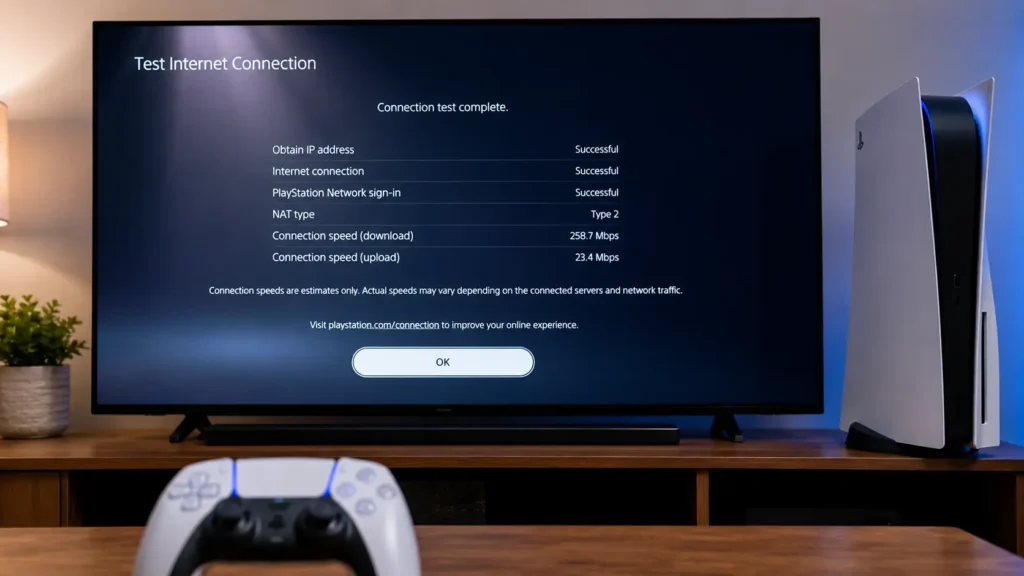
Your PS5 includes a built-in internet speed test that measures your network performance.
Understanding these results helps you know whether your connection is good enough for gaming.
Download Speed Explained
Download speed tells you how quickly your PS5 receives data.
It affects:
- Game downloads.
- Software updates.
- Streaming.
- Digital purchases.
Higher download speeds reduce waiting time but do not always improve gameplay.
Upload Speed Explained
Upload speed measures how quickly your PS5 sends data.
It affects:
- Online multiplayer games.
- Voice chat.
- Live streaming.
- Cloud saves.
A steady upload speed helps maintain smooth communication with game servers.
Ping and Latency Explained
Ping, also called latency, measures how long it takes for information to travel between your PS5 and the game server.
Here is a simple guide:
- Under 20 ms: Excellent
- 20 to 50 ms: Very Good
- 50 to 100 ms: Acceptable
- Above 100 ms: May cause noticeable lag
If you want better online gaming, lowering your ping is usually more helpful than increasing your download speed.
When Should You Worry About Your PS5 Connection Speed?
Not every slow connection means something is wrong. However, if your PS5 struggles during normal gaming or downloading, it may be time to investigate your internet connection.
Signs Your Internet Is Too Slow
Watch for these common signs:
- Games take a long time to download.
- Updates are much slower than expected.
- Online matches lag or freeze.
- Players teleport or move strangely.
- Voice chat cuts in and out.
- Videos buffer while streaming.
- You get disconnected from online games often.
If you notice these problems regularly, test your internet speed to see if it meets the recommended levels.
Common Problems Caused by Slow Speeds
A slow or unstable connection can affect your gaming experience in several ways.
You may experience:
- Long download times.
- High ping and lag.
- Delayed controls.
- Slow game updates.
- Poor voice quality.
- Frequent connection errors.
- Interrupted online matches.
Sometimes the issue is not your speed but network congestion, WiFi interference, or an outdated router.
When to Contact Your Internet Provider
If you have already tried basic troubleshooting and your connection is still slow, contact your internet service provider.
Reach out if:
- Your speed is much lower than your internet plan.
- Your connection drops several times a day.
- High ping continues even with an Ethernet cable.
- You experience slow speeds during every speed test.
- Your provider reports no outage, but the problem continues.
Your ISP can check for line issues, network congestion, or modem problems.
How to Improve Your PS5 Connection Speed
The good news is that many connection problems can be fixed without buying a new console. These simple tips can improve speed, stability, and overall gaming performance.
Use an Ethernet Cable
A wired connection is usually faster and more stable than WiFi.
Benefits include:
- Lower ping.
- Fewer disconnects.
- More stable speeds.
- Better online gaming performance.
If possible, connect your PS5 directly to your router with an Ethernet cable.
Move the Router Closer
If you use WiFi, place your router in an open area close to your PS5.
Avoid placing it:
- Behind furniture.
- Inside cabinets.
- Near microwaves or other electronic devices.
- Far from your gaming setup.
A stronger WiFi signal often improves connection quality.
Restart Your Router and PS5
Restarting your equipment can resolve temporary network issues.
Follow these steps:
- Turn off your PS5.
- Unplug your router for about 30 seconds.
- Plug the router back in and wait until it fully reconnects.
- Turn your PS5 back on.
- Test the connection again.
This simple fix often solves minor speed issues.
Change DNS Settings
Changing your DNS server may improve connection reliability and website lookups.
Many players use public DNS services because they are fast and reliable.
Examples include:
- Google DNS
- Primary: 8.8.8.8
- Secondary: 8.8.4.4
Cloudflare DNS
- Primary: 1.1.1.1
- Secondary: 1.0.0.1
While DNS usually does not increase your internet speed, it can improve connection stability in some cases.
Reduce Network Traffic
Every connected device shares your internet connection.
For the best gaming experience:
- Pause large downloads on other devices.
- Stop video streaming during online gaming.
- Disconnect devices that are not being used.
- Schedule large downloads for later.
This gives your PS5 more available bandwidth.
Upgrade Your Internet Plan
If your current internet plan no longer meets your needs, upgrading may be the best solution.
Consider a faster plan if you:
- Download games regularly.
- Have several people using the internet.
- Stream in 4K.
- Play competitive online games every day.
A faster plan provides more bandwidth for your entire home.
Steps to Test Your PS5 Connection
- Open Settings.
- Select Network.
- Choose Connection Status.
- Select Test Internet Connection.
- Review your:
PlayStation officially confirms that PS5 users can go to Settings > Network > Connection Status > Test Internet Connection to test the connection.
- Download speed
- Upload speed
- NAT Type
Compare your results with the recommended speeds in the table below.
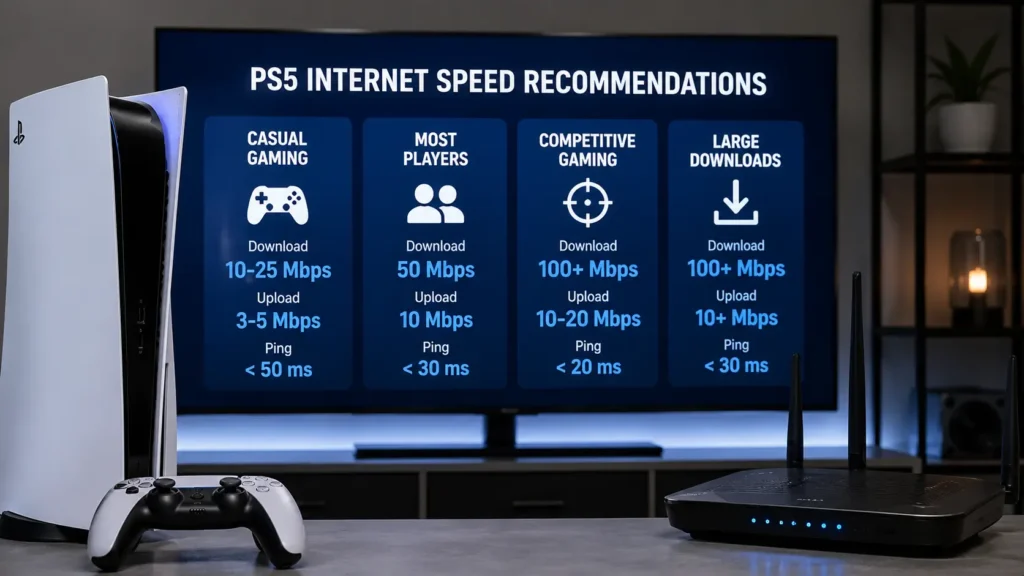
PS5 Internet Speed Recommendations
Recommended Speed Table
The following table can help you choose the right internet speed for your PS5 usage.
| Activity | Download Speed | Upload Speed |
|---|---|---|
| Basic Online Gaming | 10 to 25 Mbps | 3 to 5 Mbps |
| Most PS5 Players | 50 Mbps | 10 Mbps |
| Competitive Gaming | 100 Mbps or more | 10 to 20 Mbps |
| Large Game Downloads | 100 Mbps or more | 10 Mbp |
These are recommended speeds for a smooth experience. If multiple people share the same connection, choosing a faster internet plan is often the better option.
Final Verdict:
What Is a Good PS5 Connection Speed? For most players, 50 Mbps download and 10 Mbps upload are enough for smooth gaming.
A good PS5 connection speed for most players is 50 Mbps download and 10 Mbps upload. If you frequently download large games, play competitive online matches, or have several devices connected at the same time, 100 Mbps or higher is a better choice.
Keep in mind that internet speed is only one part of a great gaming experience. A stable connection, low ping, and a reliable router are just as important. By using the right settings and following the tips in this guide, you can enjoy smoother gameplay, faster downloads, and fewer connection problems on your PS5.
FAQS:
1. Can You Play PS5 Games With Slow Internet?
Yes, you can play many PS5 games with slow internet, but online games may have lag, delays, or disconnects. A faster and more stable connection gives smoother gameplay and a better gaming experience.
2. Does Internet Speed Affect PS5 Game Updates?
Yes, internet speed affects PS5 game updates because faster speeds download updates more quickly. A slow internet connection makes updates take longer to finish and delays when you can start playing.
3. Should You Upgrade Your Internet for PS5 Gaming?
You should upgrade your internet if your PS5 often has lag, slow downloads, or connection problems. A faster and more stable internet plan can improve online gaming and reduce waiting time.
4. What Internet Plan Is Best for a PS5?
The best internet plan for a PS5 offers at least 50 Mbps download and 10 Mbps upload. If you play online often or download large games, 100 Mbps or more is a better choice.
5. How Long Does It Take to Download a PS5 Game?
It depends on your internet speed and the game’s size. A fast internet connection can download most PS5 games in minutes, while a slow connection may take several hours.
Conclusion
A good PS5 connection speed helps you enjoy smoother gaming, faster downloads, and fewer connection problems. For most players, 50 Mbps download and 10 Mbps upload are enough. If you play online every day or download large games, 100 Mbps or more is a better choice. A stable connection and low ping are just as important.
Written By